Teach Claude a task once. Never do it again.
Claude Cowork’s Record a Skill watches you work, listens to your reasoning, and turns it into a skill it can run on its own. Free to read — the whole thing, in plain English.
Fig. 01 · What it is
You show the work. Claude writes the skill.
Record a Skill is a feature in Claude Cowork. Instead of writing out instructions, you record your screen while you do a task and explain your thinking out loud. Claude watches, then builds a reusable skill it can run on its own — on demand, or on a schedule.
Your screen, clicks, typing, and voice while you do a real task.
It turns that demo into a structured skill — the steps plus the logic behind them.
Run it later by hand, or schedule it so Claude repeats the task without you.
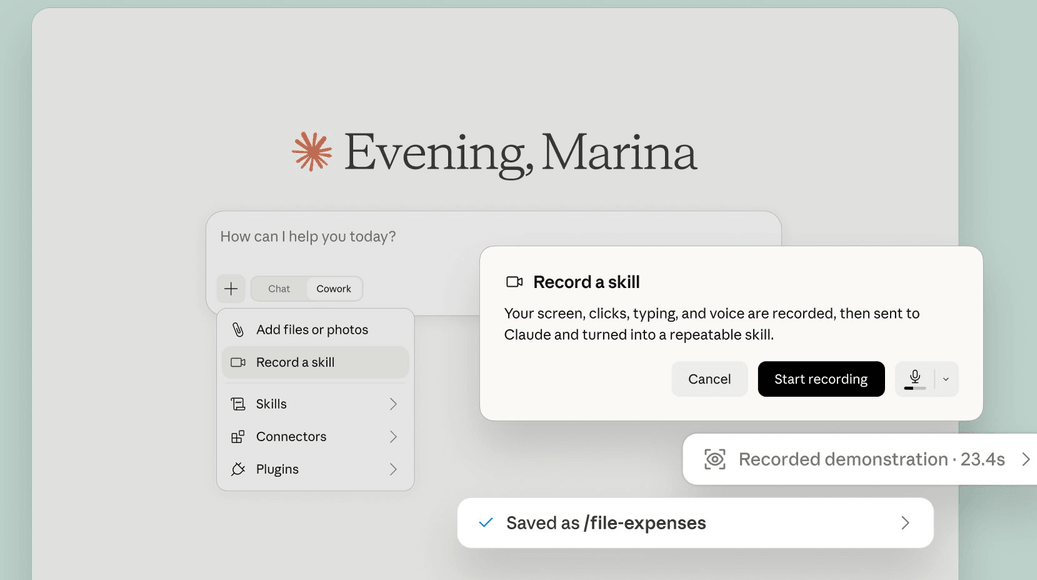
Fig. 02 · Who it’s for
Best for boring, repeatable work
If you do the same desktop task every week — a report, a cleanup, a bit of data wrangling — and you can explain the rules as you go, this is for you. It’s built for operators, founders, and anyone tired of re-doing the same clicks.
- Repetitive, rule-based work — weekly reports, file cleanup, tidying data.
- Tasks with clear logic you can say out loud (“when I see this column, filter it like this”).
- Work in apps or browsers, where your clicks are visible.
- Fuzzy tasks that need fresh judgment every single time.
- Work that depends on systems with no clear on-screen signals.
- Anything with sensitive data on screen you’d rather not record.
Fig. 03 · How to use it
Six steps, start to finish
- 1
Open Claude, then Cowork
Start a Cowork session, or make sure Cowork is switched on.
- 2
Start recording
Click the + in the composer and choose “Record a skill.” A dialog explains that your screen, clicks, typing, and voice will be recorded and sent to Claude.
- 3
Do the task like you normally would
Open apps, click, type, move through files. You don’t have to be perfect — Claude works out the steps that matter. One tip: keep it clean. Claude captures every click, so a stray tab gets repeated too.
- 4
Talk through your thinking
Say why you click what you click, the rules you follow (“if this shows up, do that; if you hit an error, skip it and note it”), and which details matter versus which can change. Your narration becomes the skill’s logic.
- 5
Stop when you’re done
End the recording. Claude turns the video, audio, and clicks into a skill.
- 6
Review, test, and use it
Claude saves the skill to your library. Try it on a fresh example, tweak or re-record if needed — then run it by hand, or ask Claude to schedule it (“run this every Monday at 9am”).
Fig. 04 · Before you start
What you need
- The Claude desktop app on macOS, updated to the latest version.
- A paid plan — Pro, Max, or Team. (Not on Free.)
- Cowork turned on in the app.
- Two macOS permissions granted to Claude: Screen Recording, and Accessibility (so it can see your clicks and keystrokes).
- A repeatable task you do on your own desktop — in a browser, an app, or your files.
Without those permissions, Claude can’t watch or replay what you do.
Fig. 05 · Good to know
Limits & fine print
- macOS and the desktop app for now — Windows isn’t announced yet.
- Rolling out gradually — if you don’t see it, update the app and check your plan.
- Your screen and voice are recorded to build the skill, so keep sensitive info off-screen.
- To re-run a skill, Claude usually needs the same setup — same apps, extensions, and permissions — and sometimes your Mac awake.
Recorded vs. written skills: Claude already lets you build skills by hand — writing the instructions in a file and uploading them. Record a Skill flips that: you show the work, and Claude writes most of the logic for you. The fastest way to turn what you know into something Claude can repeat.
Free bonus
Get the one-page cheat sheet
Prereqs, the six steps, and best-fit tasks — on a single page to keep by your desk.
Download the PDF →No email required.
Try it this week
- 1Update the desktop app and confirm you’re on Pro, Max, or Team.
- 2Turn on Cowork and grant Screen Recording + Accessibility.
- 3Pick one boring weekly task and record it — narrating as you go.
Then test the skill — and once it’s solid, schedule it and stop doing that task by hand.
The point isn’t to automate everything. It’s to hand off the repeatable, so your attention goes where only yours can — the thinking.